
HomeIntegrations → TableCraft

Live in the marketplaceAnalytics

TableCraft — a Kommo report builder in a spreadsheet

The widget builds reports on leads, tasks, calls and contacts right inside Kommo — in a live spreadsheet with formulas. Like Excel, except the data arrives by itself: no exports, no Google Sheets and no developer.

Price$24.90/mo
Trial7 days free
Data8 entities
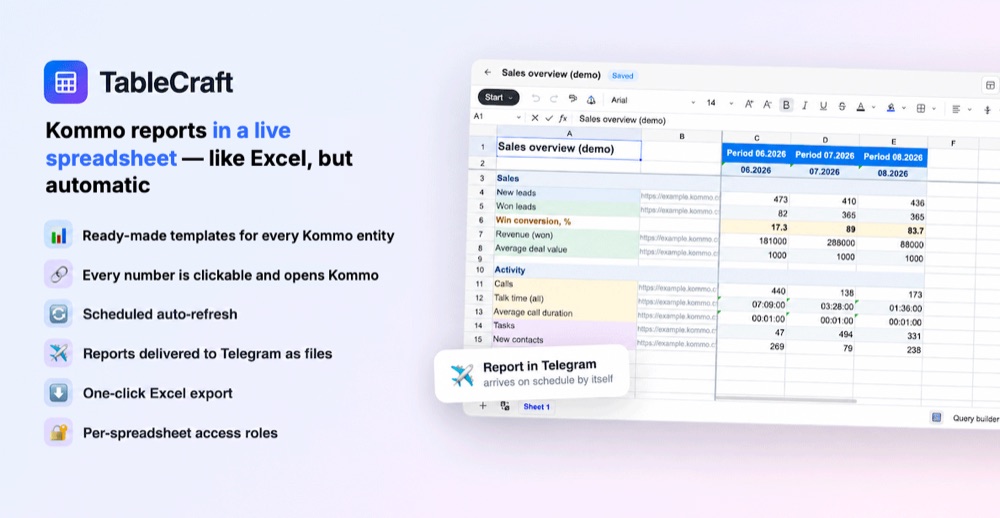
A TableCraft sales report in a spreadsheet inside Kommo

Why a separate report builder

Built-in analytics answers the standard questions, but the moment a manager needs their own cut of the data — conversion for one specific source over three months, revenue by team, calls broken down by pipeline — the manual work starts. Export to Excel, stitch the sheets together, redo the formulas. A month later the report is stale and it all happens again.

TableCraft removes that loop. You lay the spreadsheet out once: filters on the left (a Kommo filter URL, or a query assembled in the builder), periods on top. The widget calculates the values at the intersections and writes them into the cells. From then on the report refreshes on a button or on a schedule, and ordinary spreadsheet formulas work on top of the numbers — totals, conversions, percentage of target.

The key difference from an export: every calculated figure stays a link. Clicking a number opens the exact selection of leads it came from. “Where does this number come from?” takes one second to answer instead of half an hour.

What the widget does

Reports live on their own page in the left menu — the spreadsheet opens where you already work and does not get in the way of the pipeline. The data comes straight from your account: the widget changes nothing in leads or tasks, it only reads.

A finished report can be exported to Excel in one click, or delivered to Telegram automatically — to the people you choose, on the schedule you set.

  • Eight ready-made templates
  • Query builder
  • Leads, tasks, calls, contacts
  • Companies, events, customers
  • Clickable numbers that open the source
  • Manual or scheduled refresh
  • Ordinary formulas on top of the data
  • Excel export
  • Report delivery to Telegram
  • Per-employee access: edit, view, hidden
Ready-made report templates

Every template opens already filled with your own data: the axes are populated from your pipelines, stages and list of employees. After that you can edit it like any spreadsheet.

Sales overview

Key monthly metrics: leads, conversion, revenue, average deal value, calls and activity.

Leads by stage

Number of leads at every stage of the main pipeline by month, with totals.

Leads by manager

Number and budget of every manager’s leads by month, with group totals.

Calls by manager

Number of calls per manager, total talk time and average call duration.

Tasks and events

Every manager’s tasks by month with a total, plus the account’s event count.

Client base

New contacts and companies per manager by month, with totals.

Customers and consolidated report

Number of customers, their LTV and the account’s consolidated statistics by month.

Blank spreadsheet

A clean sheet — lay out the axes yourself or with the query builder.

A query builder instead of hand-written filters

To produce a number, the widget needs to know what to count. The quickest way is to copy a filter URL straight from the interface: you set the selection up by eye, then paste the address into column B. When there is no filter at hand, the built-in builder assembles one.

Pipeline, stages, owners, tags, fields, entity type and cell format are all picked with clicks — the query address builds itself. You choose separately what goes into the cell: a count, a budget sum, text with a link, or a plain number.

Access, schedule and Telegram

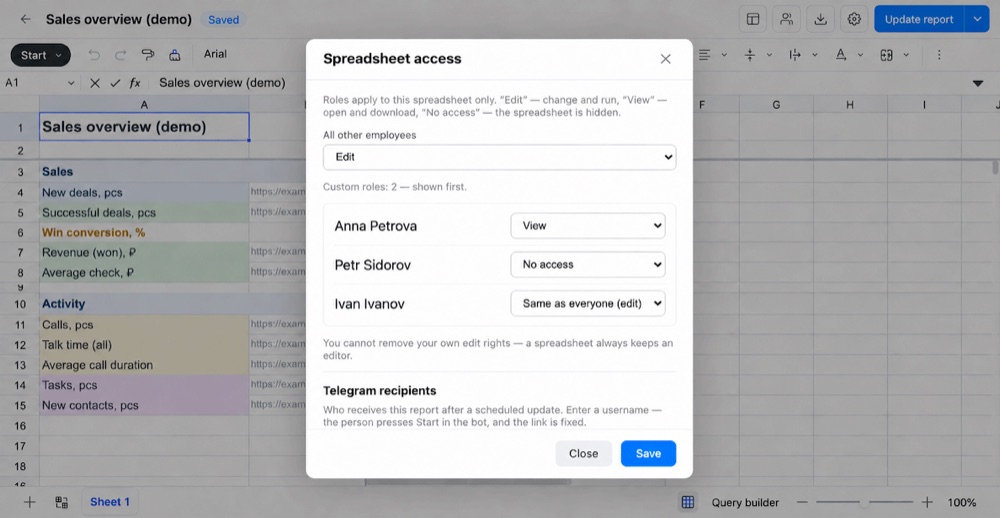
Not everyone should see every report. The role is set per spreadsheet and per employee: “Edit” — change and run it, “View” — open and download without changes, “No access” — the spreadsheet is hidden entirely. A team lead sees everything, a manager sees only their own reports.

The same place holds the refresh schedule and the list of Telegram recipients: once a scheduled recalculation finishes, the file goes out to the right people by itself. An employee presses Start in the bot once, and the link is fixed to their Telegram ID rather than to a username.

Spreadsheet access roles and Telegram recipients in TableCraft

How to start

01

Install

Press “Install” and confirm access. A TableCraft item appears in the left menu of your account.

02

Pick a template

Choose a ready-made report — the axes fill with your own pipelines, stages and managers.

03

Update

Press “Update whole report” — live numbers from your data appear at the intersections.

04

Configure

Set the refresh schedule, employee access and report delivery to Telegram.

Frequently asked questions

If something is missing, write to support@claudecraft.ru — we reply within the business day.

Do I need Google Sheets or Excel?

No. The spreadsheet is built into the widget and runs inside your CRM. Excel is only needed if you want to download a finished report as a file — that is one button.

Does the widget change anything in my leads?

No. TableCraft only reads account data through the official API and writes the result into its own spreadsheets. Leads, tasks and pipeline settings are left untouched.

Can it count by my custom fields?

Yes. The query builder exposes custom lead fields, and any filter URL from the interface can be pasted into the spreadsheet as it is.

How often does the report refresh?

Manually with a button, or on a schedule — the interval is set per report. After a scheduled recalculation the file can be sent to Telegram automatically.

Who will see the reports?

Access is configured per spreadsheet and per employee: edit, view only, or hidden completely. By default a new spreadsheet is visible to its creator and to account administrators.

What happens after the trial?

The first 7 days are fully free and no card is required. After that it is $24.90 per month per account, with no limit on the number of employees or reports.

First report in three minutes

Seven days free. Questions about the widget: support@claudecraft.ru. Privacy policy.

Install in Kommo