HomeIntegrations → Task traffic light

Live in the marketplaceFree

Task traffic light — overdue leads visible on the Kommo board

A free widget that colours cards on the pipeline board and rows in the list by the state of the nearest task: overdue, due today, scheduled — or no task at all. A team lead sees the gaps without opening a single lead.

PriceFree
Works inBoard and list
SetupA couple of minutes
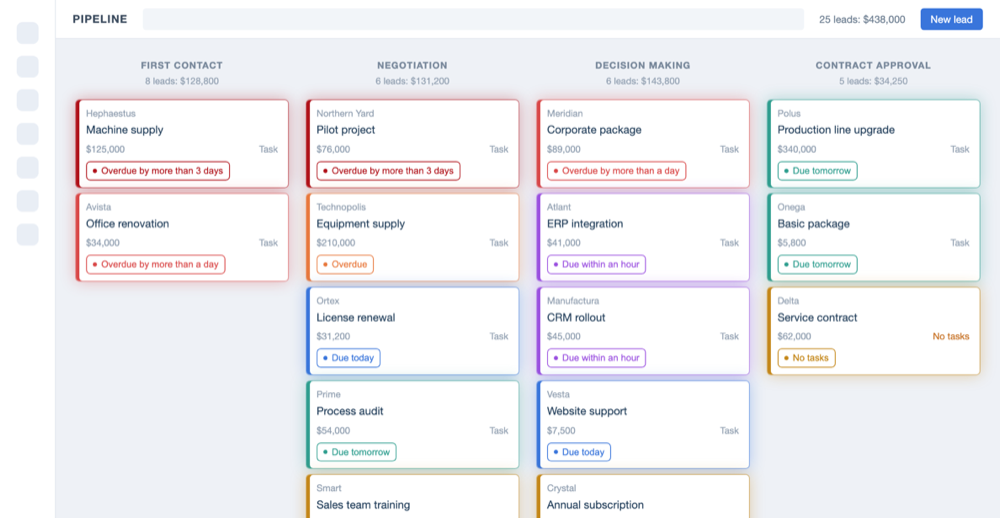
Kommo pipeline board with overdue leads highlighted and a legend

The problem it solves

The state of a task is hidden inside the lead card. Until a team lead opens the deal, they have no idea whether it is being worked on or has been sitting still for three weeks. On a pipeline with a hundred leads that means one thing: problems are found after the fact, once the client has already gone elsewhere.

Standard filters only help so much. You can pull up “leads with overdue tasks”, but then the picture of the pipeline disappears — you no longer see which stage the backlog is piling up at, or whose it is. And nobody switches between filters every morning.

Task traffic light solves it with colour. The board stays a board — all the stages and totals are still there — but each card is tinted by the urgency of its nearest task. One look replaces a round of the team: you immediately see where the red is, how much of it there is, and which stage it has collected at.

What the widget does

Highlighting works both on the board and in the list of leads. By default there are seven urgency levels, from “overdue by more than three days” down to “due tomorrow”, plus a separate colour for leads with no task at all. That last category is usually the biggest one.

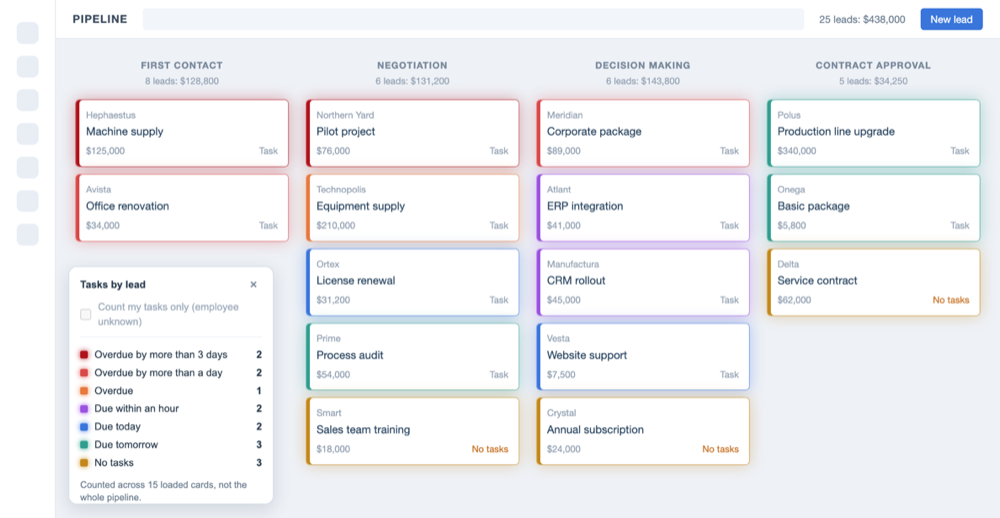
The legend with counters shows how many leads are in each state among the loaded cards, and collapses in one click if it gets in the way.

  • Overdue by more than three days
  • Overdue by more than a day
  • Overdue
  • Due within the hour
  • Due today
  • Due tomorrow
  • Leads with no task
  • Legend with counters
  • Works in the list of leads
  • Choose pipelines and colours

State labels on the cards

When colour alone is not enough, text labels can be switched on. The card then shows not just “red” but exactly what it means: “No task”, a specific due time, or how far overdue it is. Handy when the board is used by people who have not memorised the colour scheme yet — and for screenshots at a stand-up.

Lead cards with text labels showing the task state

It works in the list too

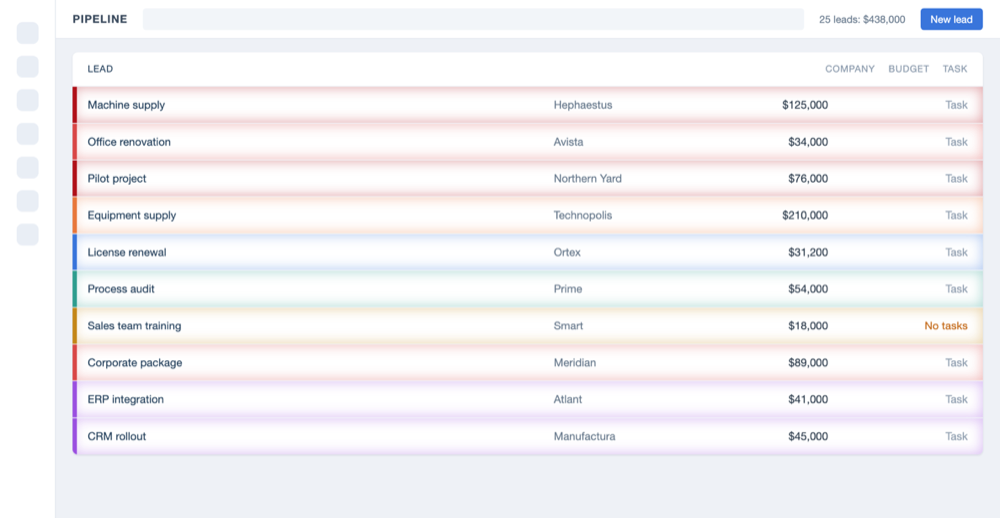
Where the board is awkward — long pipelines, bulk operations, exports — people look at leads as a list. The highlighting stays: the row gets a stripe on the left and a soft fill, so overdue leads are visible in table mode as well.

List of leads with overdue rows highlighted

It follows your process

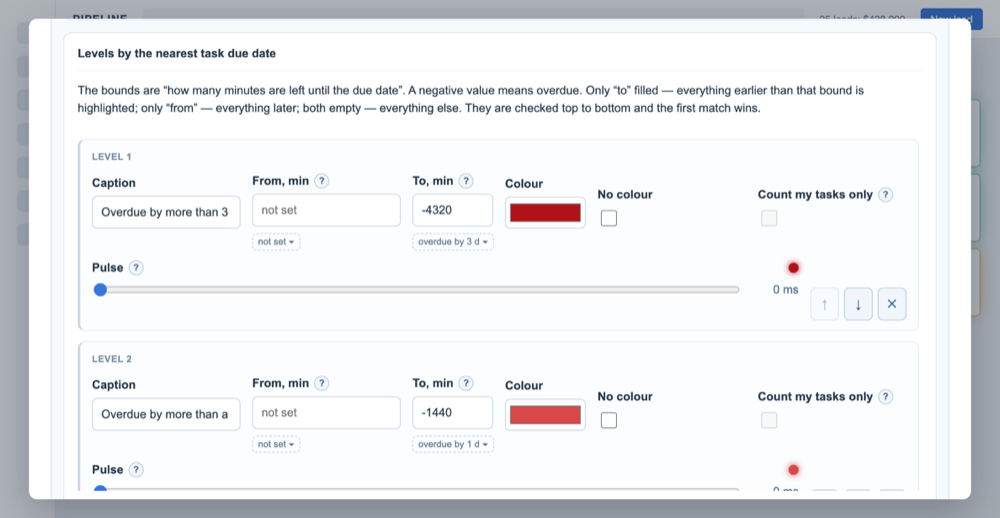
The urgency levels are not fixed. Thresholds are set in hours and days: if your customers expect an answer within two hours rather than a day, the scale is rebuilt around that. Colours, fill intensity, the border and the inner glow are adjustable too — you can make the highlight soft or deliberately loud.

The pipelines the widget runs in are chosen separately, so a service or archive pipeline can be left unpainted to keep the noise down.

Configuring urgency levels by the due date of the nearest task

Every employee sees the highlight only for the tasks their permissions allow them to see.

Frequently asked questions

The widget is free. Questions and suggestions — support@claudecraft.ru.

Is it really free?

Yes, with no trial period and no limit on the number of employees. It installs from the marketplace in one click.

Does it change my leads?

No. The widget only reads task due dates and paints the interface. Leads, tasks and card sizes are left untouched — remove the widget and everything is exactly as it was.

Will a manager see other people’s tasks?

No. The highlight is built from the tasks that employee is allowed to see. If they cannot see the lead, they cannot see its colour either.

Can I enable it for some pipelines only?

Yes, the list of pipelines is picked in the settings. The rest stay in their usual look.

What counts as “no task”?

A lead with no open task at all. It is usually the most dangerous category: the deal is formally in progress, but no next step has been scheduled for it.

Does it slow the board down?

No. The widget works with the cards that are already loaded and does not fire an extra request per lead — the legend counters are calculated among those loaded cards, which the legend says explicitly.

Install it and look at your own pipeline

The widget is free and installs in one click. Questions: support@claudecraft.ru. Privacy policy.

Install in Kommo